

Explore & Master your Kadabra!
From your first steps to professional performance.
Everything you need to unlock the full potential of Kadabra.
The learning paths:
In-App Guidance
In-App Lessons
Step-By-Step interactive lessons built directly into Kadabra OS
that follow your progress in real-time.
Ask KAI
Kadabra OS has an integrated AI (KAI) that can help you understand how to perform specific actions you want. KAI will grow to empower your music too in future free updates
Tips
Inside Kadabra OS, on mouse-over, you'll get detailed information on all the buttons, functions and areas that are the core of the Kadabra Music Workstation.
Tutorials
A curated library of video courses (some are found below) fully integrated into the Kadabra OS covering basic to pro performance skills.
Kadabra Introduction!
what are all these buttons?
know the terminology
Kadabra Software!
Which software do you get with your Kadabra?
Kadabra Calibration!
Calibrate Kadabra to your pulse!
Keyboard sensitivity and Motion
Looper Tutorial 1!
Learn how to use the Looper!
Build a Drum Sequence
Looper Tutorial 2!
Learn how to use the Looper!
Record a Loop, Quantize, Add Notes to Loop, Reset Loop
Looper Tutorial 3!
Learn how to use the Looper!
Add a sequence on Pattern 2, change Loop Length & Seq Length
Viber Tutorial 1!
Learn how to use the Viber!
Controlled by Motion, Synchrd to Beat Structures, change Note Gates...
Performer Tutorial 1!
Learn how to use the Performer!
Save, Load, Change Sets, Song Progression
Performer Tutorial 2!
Learn how to use the Performer!
Understand the Console, Name a Saved state, Load BPM, Load Tonic...
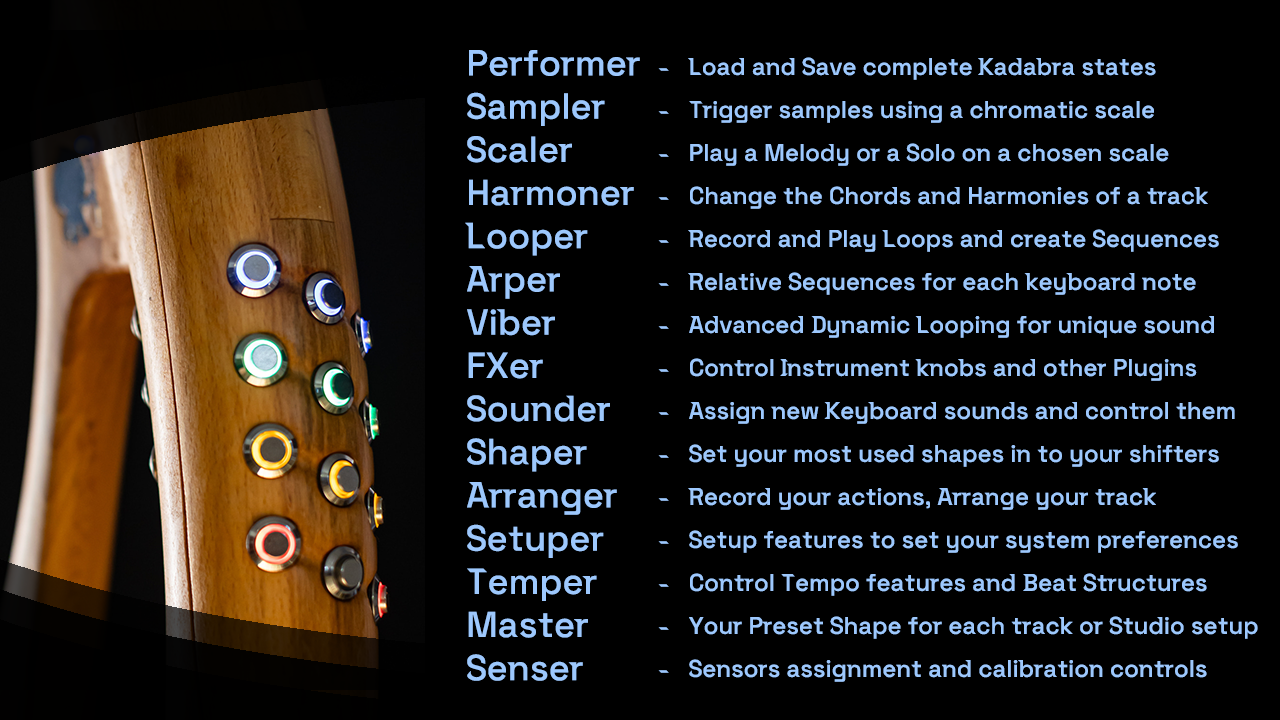
A Shape-Shifter
The Kadabra® MW is equipped with 15 inner shapes (modes) that transform the entire functionality of the instrument.
when switching to a “Shape” like Looper, you can control the functionality of that Shape using your left hand and activate functions like Play/Stop, Record, Mute, Quantize, Load, Save and others…
Kadabra's Shapes
Temper - Control Tempo speed and Beat structures
Temper is staying always on the Top Util button (one of the 3 buttons above the Keyboard, around the Wheel). it lets you control the BPM, Beat-Structure and Swing, it can be used as a fast Tap-Tempo or a Play/Stop or a Rec switch for the Looper.
Master - The personalized shape for performing and creating
The Master shape, is where complexity becomes a simple button flicking. take ANY feature of ANY shape and just put it in one of the Master’s Combi buttons. one can be Play/Stop, the other a specific Harmony, then a Tempo change and a sample play. you can even create a Combi that has several actions in a one button flick
Senser - Motion to Midi, PRS and other sensor features
Flicking the Senser button will just toggle the Motion ON and OFF, but holding it opens an option to send a specific Motion trigger (for Midi Learn), set a Motion Axis for Pitchbend Control, Viber Speed or Gate, Velocity and other controls.
Performer - Load & Save complete Kadabra states
the Performer shape is where you keep different songs/tracks that are ready for you to play on your Kadabra. You can return to any state that you created in a flick of a Combi. Every state can be saved for loading with its own BPM (for example in a new song) or can be beat-mixed with the current BPM and its tempo possition. The same goes for the Tonality of the track (new or keep as it was), and some other options.
Sampler - Trigger samples using a chromatic scale
The Sampler shape, changes the Keyboard to chromatic, showing all the possible notes.
Scaler - Play Melodies and Solos on a scale
The Scaler shape, changes the Keyboard to the Scale you choose, and alows you to change that scale in a dynamic way to help you create and perform perfectly tuned
Harmoner - Play Chords and Harmonies of the whole song
The Harmoner shape, not only changes the Keyboard to chords of the Scale’s Harmonic Modes, it also controls the harminies of a Playing song for each sound that is set to “Relative” (notes are relative to the scale and harmony).
Looper - Record & Play loops and create Sequences
Shifting to the Looper shape, anables you to use both Loops and Sequences.
Play/Stop, Record, Mute, Quantize and manipulate Loops, Load, Save and control Sequences. each Sound can have 4 different Loops and 4 different Sequernces armed for instant launch. you can control Loop and Seq lengths, and create a Sequence, Looper sounds can be Relative (for melodic/harmonic sounds) or Static (usually for Drums)
Arper - Relative Sequence launcher for each tone
the Arper is actually a crossbreed of the traditional Arpeggiator and a smart sequence launcher. in Relative mode, the Arper launches a premade sequence of notes that are musically related to the note being pressed and aligned to your cosen scale and harmony, creating mezmorising tonality and flow
Viber - advanced dynamic looping for unique sounds
The Viber is our own invention of a short dynamic loop that its length can be controlled by the Motion section or synced to the rhythm.
FXer - Control knobs and faders of DAWs/VSTis/Plugins
for your Vocals or your whole mix, for specific or global effects that needs fine tuning or expressive changes, the FXer can control upto 48 knobs for each Midi Channel! just hold a Combi and set the amount desired using your Keyboard
Sounder - Control & assign sounds to a Keyboard row
Assign each sound (or a few of them), to one of the Keybord rows (or both). Control each sound’s settings (like Looper’s Relativity, Harmonic channel follow, VSTi type, Arper state, Viber state…), change sounds inside the VSTi, and set the Active sound that you are working on.
Shaper - Set your most used shapes into your Shifters
Set your Main shape or a shape to each of the 3 Shifters for fast shape entering
Setuper - Calibrate and Setup system and features flow
Calibrate your system (computer), your Kadabra’s Motion drift, scan speed, keyboard sensitivity, lights strength and more
there are 3 main paths that you can take
please choose one and start learning:
Play
Produce
Perform